
Honestly: We've been getting the same three questions for months. „Am I even affected by the e-invoicing mandate?“ „XRechnung or ZUGFeRD – what should I take?“ And in the end: „This routing ID that is on the authority's order – is it even correct?“
Instead of answering these questions for the hundredth time in calls, webinars, and email threads, we sat down at the whiteboard and built three free tools. Online, in the browser, no login required. Nothing goes to our servers. Here's the overview.
Tool 1: The Duty Checker
Five questions, then you'll know. Are you based domestically? Small business owner? Revenue last year? Who are your customers? Can you receive e-invoices?
In the end, you get an assessment with an urgency level—ranging from „everything is relaxed“ to „you should have started yesterday.“ Including a note on the specific deadlines that apply to you, and a PDF export to take with you or forward. Practical for managing directors who want clarity, for tax advisors who want to classify clients, and for bookkeepers who need to know what actually needs to be done now.
Tool 2: The Format Decider
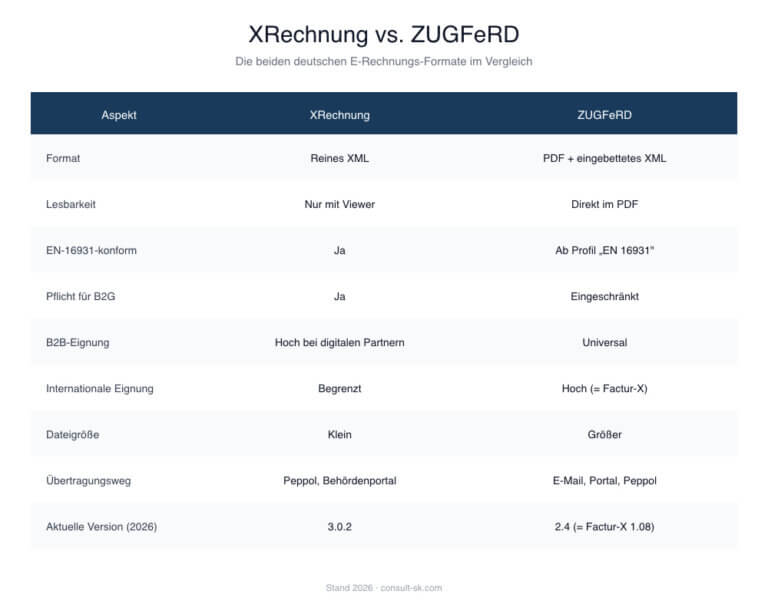
XInvoice or ZUGFeRD is the kind of question where an honest consultant first answers „it depends.“ But exactly for this „it depends,“ we made the tool.
Four questions about your customer structure, your level of digitalization, and your priorities – ending with a concrete recommendation. Including pros and cons, possible special cases such as Factur-X or Peppol, and concrete next steps. Small bonus: The tool is also allowed to say „take both“. Because sometimes the hybrid approach is actually the most honest answer.
To the Format Decision Maker →
Tool 3: The Routing ID Checker
This is our favorite tool because it answers technical questions in a technically sound way. Do you have a routing ID on your official order? Type it in, and the tool will check the format and check digit according to KoSIT Specification 2.0.2 – mathematically using the Modulo 97-10 method. The same method used for IBANs, if that reassures you.
If the check digit is incorrect, the tool suggests the correct one. This way, you immediately know if you're on the wrong track or if you need to get back to the client because their ID has a typo. This saves a phone ping-pong that would otherwise often cost three days of processing time.
What all three have in common
All calculations run exclusively in your browser. No registration, no data transfer to our servers, no tracking. Sensitive data such as route IDs also remain local to your device. We didn't build it this way for PR reasons, but because we ourselves don't want to temporarily store any third-party authority data anywhere. It's simply cleaner that way.
The logic is based on the official specifications: BMF letter of October 15, 2025, KoSIT specification Leitweg-ID 2.0.2, XRechnung 3.0.2, and ZUGFeRD 2.4 (as of 2026). As soon as something important changes, we will update the tools accordingly.
And now?
Try out the tools, send them to colleagues who always ask the same questions, and let us know if you're missing anything. If you're missing a fourth tool in the toolbox – a PEPPOL ID validator, perhaps, or an archiving check? – send us an email. We're collecting ideas for the next round.
You can find all three tools clearly laid out on our Tool Page. If you want to delve deeper into the topic afterward – keywords CICS, CBCS, Integration into your SAP – does the path lead directly on to E-Invoice in SAP.